
Introduction
Monitor manufacturers are keen to improve the efficiency of their devices and show off their ‘green’ credentials by such innovations as using energy-efficient LEDs (Light Emitting Diodes) as a backlight. Not only does this improve efficiency by drawing less power (and importantly – wasting less energy through heat); it also allows the product to be free of mercury (an environmental issue during disposal), thinner and lighter. Some manufacturers also claim that LED-backlit screens can create a brighter and ‘purer’ flicker-free image than monitors with CCFL (Cold Cathode Fluorescent Lamp) backlights.
Samsung uses strips of white LEDs around the inside of the bezel (hence edge-lit LED) in place of CCFL lamps to offer these potential advantages to XL2370 users. We put these assertions to the test as we review Samsung’s legacy LED-backlit monitor and find out if the Samsung SyncMaster XL2370 can outshine its lesser-lit brethren.
Specifications
On paper, the Samsung SyncMaster XL2370 looks just like any other new 23 inch Samsung on the market, with a few exceptions that PC Monitors has kindly highlighted for its readers. As well as being lighter and consuming less power than you’d expect from a 23-inch LCD display, the XL2370 also sports a ‘MEGA’ Dynamic Contrast mode which increases the contrast ratio to an astronomical and eye-bleeding proportions. The backlight of the XL2370 is powered by light emitting diodes (LEDs) rather than the cold cathode fluorescent lamps found in other Samsung’s and most LCD monitors. In this review, PC Monitors will extensively test the XL2370 on a range of applications to see how the specifcations are reflected in the real-world performance of the monitor.
Features and aesthetics
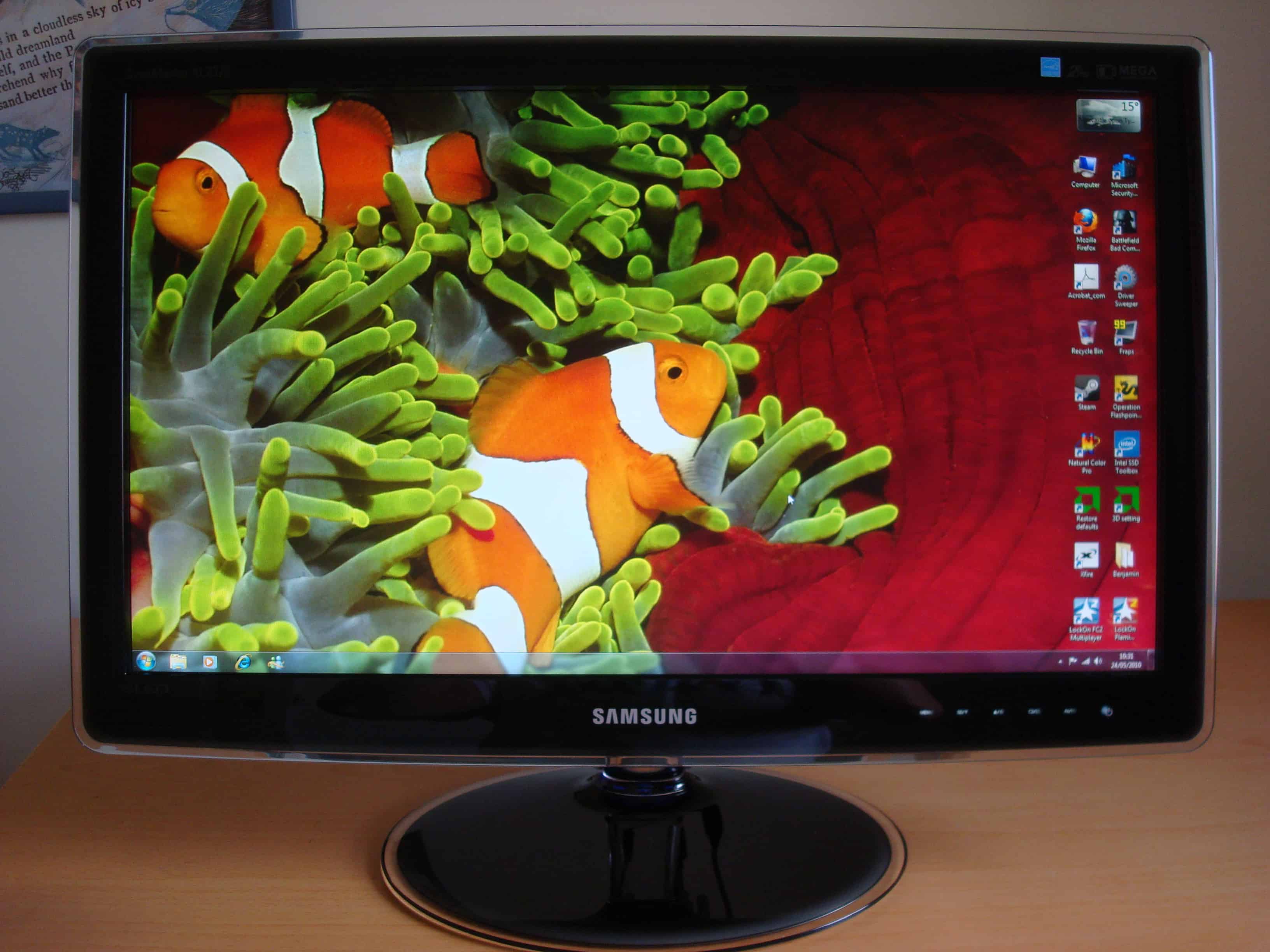
The Samsung SyncMaster XL2370 really is a stunning monitor to look at. With its thin, sleek and light 23-inch profile, the LED-backlit XL2370 is a mere 16mm thick making it, as Samsung puts it, finger thin. This thin profile compares favourably to most CCFL-backlit monitors which tend to be over 60mm thick. The XL2370 is also surprisingly light for a 23-inch monitor at under 3.6kg.
Looking at the XL2370 from the rear, in particular, you can see how attractive its crystal-blue tinted glass stand is. Although the stand certainly looks attractive, it does seem stability took a back seat here; the stand does tend to wobble a bit if pushed lightly from any angle. Adjustability of the XL2370 is also limited by the fixed stand, which only allows the screen to be tilted backwards and forwards slightly. This gives you a fixed clearance between the bottom of the bezel and the computer desk of around 3 inches.
From the front the XL2370’s elegant, glossy and curvaceous design becomes apparent. The gently curved bezel is surrounded by a thin transparent plastic perimeter, which soaks up the lighting in the room and gives an aesthetically pleasing finish. The oval baseplate of the stand has a similar aesthetic with a curved plastic perimeter – although the attractive blue tint of the neck is not very apparent from the front as the screen protrudes forwards from the neck of the stand. The inside of XL2370’s bezel is equally glossy and the screen itself is inset relatively deeply into the bezel. This means that you get reflections of the screen image on the inside of the bezel which can be a little distracting at times.
In the bottom right of the image below, you can see the mild white glow of the XL2370′s touch-sensitive controls. You can set the panel to glow either continuously or as you sweep your finger across, depending on your preference. Whilst this is aesthetically pleasing; some prefer the tactile feel of actual pressable buttons, and on such a glossy surface grubby finger prints start to become an issue.

The Samsung XL2370 has all the essential input options that most people will need and even a few extras. There is a DC input for the supplied power adaptor, a DVI port, VGA port, HDMI port as well as audio out and digital audio out ports. There are no USB ports, but this would make the input panel somewhat overcrowded and possibly drive up the price and power requirements of the monitor. On such a thin panel this would probably be pushing it.
The onscreen display of the XL2370 is reasonably easy to navigate once you get the hang of the touch-sensitive controls and offers a respectable set of adjustability options. As well as the usual brightness, contrast and sharpness adjustments you are able to change the response time settings (normal, fast or faster), choose from 3 gamma presets, adjust the balance of individual colours and apply MagicBright presets; Custom, Text, Internet, Game, Sport, Movie and Dynamic Contrast.
Performance
Calibration
We performed a basic calibration of the XL2370 using the ‘Display Color Calibration’ feature of Windows 7. Whilst the use of a colorimeter would undoubtedly have led to better results (highly recommended for professional use), we felt it was more appropriate and fair to use a by-eye calibration procedure that is readily accessible to home users. Because the XL2370 is lit by a border of white LEDs it is not necessary to wait 30 minutes or more for the screen to ‘warm up’ prior to calibration; although it is still a good habit. Bear in mind that, as with any Twisted Nematic (TN) panel; the gamma curve of the monitor is viewing angle dependent. This means that you are only really calibrating specific points of the monitor from a particular viewing angle – if this is done by eye it is particularly important that your head height is as it would most commonly be when using the monitor.
For further information about computer monitor calibration please read this TFT Central article. If the Windows 7 calibration procedure is unfamiliar to you we advise you to either read this or quickly scan over this section.
As with other Samsung monitors, we found that the general performance of the XL2370 in these ‘tests’ could be instantly improved by switching from gamma ‘Mode1’ to ‘Mode2’. After this simple switch was made we proceeded with the calibration. We left the gamma alone in accordance with the first test as results from our usual seating position were pleasing – you could also see the gamma shift associated with TN panels if you moved your head slightly on this first test. For the second test, adjusting the brightness made little difference – we left this at 100%, although you should lower it according to your preferences or if you experience eyestrain. The contrast could be comfortably bumped up from the default 75% to 100% without any loss of fine detail in the next test – but as we discovered later there are better ways to test if the contrast is OTT. The final test revealed that the XL2370 displayed a slight blue tinge to the greys, so we bumped down the blue slider 5 notches to compensate and produce lovely neutral greys. We were then able to compare the current calibration effort with the previous calibration profile; the blue tinge of the XL2370 under the default calibration was all too noticeable using this direct comparison.
We performed further calibration of the XL2370 using a nifty tool from Samsung’s included software CD called ‘Natural Color Pro’. The contrast test on this tool revealed that at 100% the four white circles (each a slightly different shade of white) were bleached and therefore become indistinguishable from one another. The circles became distinctive at a contrast level of around 80%, but not really much higher. This is slightly higher than the default 75% but certainly lower than the 100% permissible by Windows 7’s otherwise decent calibration procedure.
Contrast and brightness
Samsung claims that the SyncMaster XL2370 will produce a typical brightness in the region of 300cd/m2 and a static contrast ratio of 1000:1. These seem fairly comfortable if not modest typical values and we have no reason to doubt these claims. Samsung are not entirely innocent, however, as they do play the all too common, slightly insane and somewhat fairylandesque numbers game with their figures for the XL2370’s dynamic contrast ratio. When dynamic contrast is enabled, the backlight intensity is varied depending on the level of black and white (or dark and light) on the screen. This means that the backlight would be turned off (or very close to it) if an entirely black screen was to be displayed; hence no backlight bleed-through to raise the luminance of the black and decrease the possible contrast ratio. This apparently allows the XL2370 to reach a ‘dynamic contrast’ ratio of a staggering, eye-popping and astronomical 5 million: 1.
We were of course itching to test all of Samsung’s claims, so we got out our trusty light meter to test the XL2370’s brightness (luminance) in an entirely white image, an entirely black image and the resulting contrast ratio using various manufacturer settings. The results can be seen in the table below with significant values highlighted in blue and discussed in the proceeding section. Note that in all custom modes the contrast was set to 100%, but varied according to manufacturer settings for MagicBright preset modes.
| Monitor profile | White luminance (cd/m2) | Black luminance (cd/m2) | Contrast ratio (x:1) |
| Custom, 100% brightness | 440 | 0.69 | 638 |
| Custom, 85% brightness | 390 | 0.54 | 722 |
| Custom, 75% brightness (default) | 360 | 0.49 | 735 |
| Custom, 60% brightness | 310 | 0.37 | 838 |
| Custom, 40% brightness | 240 | 0.28 | 857 |
| Custom, 35% brightness | 230 | 0.22 | 1045 |
| Custom, 30% brightness | 210 | 0.18 | 1167 |
| Custom, 20% brightness | 180 | 0.12 | 1500 |
| Custom, 10% brightness | 150 | 0.10 | 1500 |
| Text | 220 | 0.21 | 1048 |
| Internet | 290 | 0.32 | 906 |
| Game | 450 | 0.69 | 652 |
| Sport | 330 | 0.47 | 702 |
| Movie | 400 | 0.52 | 769 |
| Dynamic Contrast | 440 | <0.01 | >44000 |
From the table above, you can see that Samsung’s stated 1000:1 static contrast ratio was achieved at (or indeed just above) 35% brightness and exceeded below this brightness level. The image is still acceptably bright for desktop work at this setting (it’s no coincidence that the ‘text’ MagicBright preset is set to 33% brightness) but this doesn’t give the best experience in movies and games. Whites also take on a slightly dirty red tinge in the top right of the screen under this setting. Once the brightness level reaches 60% the image becomes much more pleasing. Blacks are nice and solid with no visible tinge and the image is still nice and bright for desktop work. Whites at this setting are also clean and bright.
As with any panel using LCD technology, the XL2370 suffers from backlight bleed (if there was no backlight bleed then the black luminance levels would always be nearly 0 cd/m2).We found that the backlight bleed was most severe at the bottom right edge of the XL2370, although it was certainly nothing major and we have seen far worse. We would also like to stress at this point that each panel is different and although some particular models are more prone to bleeding than others, our XL2370 had acceptably low levels of bleed and some XL2370s will probably have even less. At the default brightness level of 100% blacks take on a very slight purple tinge (a slightly high luminance value of 0.69 cd/m2) that is also visible in the game mode setting (with a luminance value that’s relatively high, at 0.69 cd/m2). This tinge is very minor, however, and blacks still look remarkably solid and contrast brilliantly with the bright and clean whites that the XL2370 outputs when viewing web pages with white text on a black background.
The peak white luminance we recorded using the ‘Game’ MagicBright preset was an exceptionally impressive 450 cd/m2 – dwarfing Samsung’s claimed 250 cd/m2 typical luminance value. This resulted in whites that were generally very bright and brilliant, although whites at the very top of the monitor take on a very slightly dirty grey tinge. This is only really noticeable if you slouch and is related to the inherent viewing angle limitations of TN panels; let this be a friendly reminder to sit up nice and straight. By setting the MagicBright mode of the XL2370 to ‘Dyanmic Contrast’ we were able to record a white luminance of 440 cd/m2 and black luminance of <0.01 cd/m2. This resulted in a Dynamic Contrast ratio of >44,000; because the black luminance level was so low it was beyond the resolution of our light meter and the resulting dynamic contrast ratio was probably considerably understated.
When we tested the XL2370 on our game titles it became clear that the backlight is exceptionally powerful. With the ‘Game’ MagicBright preset enabled the contrast and brightness performance of the XL2370 was nothing short of phenominal. On Operation Flashpoint: Dragon Rising we were reluctant to stare at the in-game sun as we feared for our eyesight (although in all seriousness going outside on a bright day is more likely to damage your eyes). Building interiors at night were suitably dark with the only light creeping in from open doors and windows –subtle details in shadows were still visible, as they should be. The brilliant contrast of the XL2370 was exemplified by different smoke types in the game; the dirty burning vehicle smoke vs. the heavenly white smoke from a smoke grenade in the sun. We had a similar experience looking into the sun on Battlefield: Bad Company 2 and found that the bloom effects in the game really hammer home the great contrast between the dark and gloomy indoors and the blindingly bright desert outside. At times the glare in the desert was quite literally dazzling and gave a nice realistic look to the desert environments.
In Colin McRae: Dirt 2 we were again taken back by the brightness of the sun and the overall excellent contrast in the game. Artificial lights such as floodlights and camera flashes were stunningly bright at night which adds to the atmosphere and made our driving even more questionable. Somebody who doesn’t have any problems with bright lights at night is Daniel Craig in James Bond: Quantum of Solace. We fired up the Blu-Ray and tested the XL2370 in both the ‘Movie’ and ‘Dynamic Contrast’ presets. We had no complaints whatsoever about the contrast in movie mode, but enabling dynamic contrast pushed the experience into the ‘insane’ territory. It really added some depth in places and made some explosive scenes in the film even livelier. Thankfully the backlight brightness shift wasn’t all that noticeable, but in some film titles it could become as troublesome. And troublesome it was in the games we tested. Rather than adding any sort of depth, brilliance or anything else positive to the experience it simply added an annoying and seemingly continuous shift in the backlight intensity. This was particularly noticeable when entering or exiting a building and can be seen even more clearly by looking at any HUD elements or crosshairs that may be visible in the game.
Returning to our custom calibrated profile we tested the XL2370’s contrast performance using a series of LCD tests provided by Lagom. These tests are designed to bring any weaknesses in a monitor’s performance to the user’s attention; even if they would not normally be clear.
The contrast test was pretty impressive with distinct blocks of ever-increasing brightness in most cases. The top 2 yellow, green and light blue and top 4 red blocks merged into one singe block and therefore became indistinguishable at the very high end. Decreasing the contrast of the monitor to 60% alleviated this problem slightly and all blocks were distinguishable, but this was still a strain and not the clear distinction you would ideally want. Regardless of contrast there were no problems on the low end, which is good.
The black level test results were decent although clearly influenced by vertical viewing angle. If the test squares are centered then then first 5 blocks (out of 20) are indistinguishable from the background. If the test squares are put as far down on the screen as possible (i.e. by scrolling up as far as possible) the first 5 squares become distinguishable from the background; although only half of the squares are actually visible on the screen. The final 15 squares were always distinctive in this test.
Using the 80% contrast setting determined by our preferences and calibration resulted in poor performance on the white saturation test. With the contrast lowered to 60% only the final 2 squares were invisible although you’d have to strain to distinguish the checkerboard patterns from the background of the third-last square. Increasing the contrast beyond the default level of 75% resulted in all but the very first square’s checkerboard being difficult to distinguish against the background white. Again, the white saturation test was heavily influenced by viewing angle. If you lower your head so that your chin is roughly level with the bottom of the XL2370’s bezel all but the last square has a distinguishable pattern. In reality the white saturation test results will make little difference to your experience; especially considering how brilliantly bright the whites are.
The XL2370 displayed a perfectly smooth greyscale gradient, which is important for games and movies to reduce/eliminate any sort of banding during minor changes in brightness across an image.
Colour reproduction
The Samsung XL2370 showed an impressive range of vibrant and dashing colours in the James Bond: Quantum of Solace Blu-ray as well as some impressively natural skin tones (which were not oversaturated) and khaki browns. We also viewed the Toy Story 3 trailer in 720p ‘high definition’ and found the lovely solid and bright (and appropriately plasticy) colours very apt and pleasing. This vibrancy was also carried over to our game testing – Bad Company 2 appeared brilliantly vivid with lush greens, impressive earthy browns and dusty kharki tones. The overall bright and punchy nature of the image really brought the game to life and there were certain moments where we just sat and quietly admired the visual treat before us. The brilliant blue of the water when viewed through the M1 Abram’s optics was truly stunning and really caught our eyes.
There were also times in our game testing on the XL2370 where we felt that the vibrancy was just a little too high and somewhat misplaced. Dragon Rising, for example, has a natural aesthetic that is not perfectly captured on the XL2370. Some earthy browns and greens appeared a little oversaturated, although the vibrancy of the image is certainly appreciated where it counts. Fires and explosions showed a brilliant range of whites, yellows, oranges and reds; although the sheer intensity of flashes on the game overwhelms such subtle details, as you might expect. Blood was a satisfyingly deep red and it is clear from the red marker smoke grenades that the XL2370 handles orange and red hues pretty nicely.
Dirt 2 was also very vibrant with an impressive range of colours. The XL2370 showed a good range of pinks, oranges and reds on the car paint jobs and the on-course advertising. The pink of in-game text and advertising was truly electrifying and probably the most brilliant pink we’ve seen outputted by a computer monitor. As with Dragon Rising the image was a little too vibrant and oversaturated in places, which detracted from the natural look. Earthy brows appeared an inappropriately rusty orange in places and some dark forest greens appeared just a little too yellow in places. Overall the XL2370’s handling of colours was very impressive for any monitor, let alone a TN panel, and made for a very rich and enjoyable game and movie experience.
Although the colours that the XL2370 are suitably vibrant and lively to satisfy the tastes of most gamers and film lovers, this does not mean that the colours displayed are accurate. We cannot make an authoritative comment on the accuracy of the colours without colorimeter testing, but according to Digital Versus and Xbit Labs the colour accuracy is excellent for a TN panel and the colour gamut itself conforms very well to the sRGB standard (see below). It is worth mentioning, however, that the colour shifts and relatively poor viewing angles that plague any TN panel also apply to the XL2370. We look at this in more detail in the proceeding section.
Viewing angles
One area where we weren’t expecting any miracles from the XL2370’s Twisted Nematic internals was its viewing angle performance. This is particularly important if you intend to lie back from your monitor (perhaps using it as a display for a games console) or require consistent colour accuracy, perhaps for professional purposes. Unsurprisingly the viewing angle performance of the XL2370 was largely as we expected. We used the viewing angle tests of Lagom to help us identify weaknesses in viewing angles. The purple block shifted between purple and pink if viewed from directly in front and flashed through an additional blue hue at times if the head was shifted. The red block appeared pink at the bottom under direct viewing with the ‘pinkness’ shifting around in accordance to head movement. The green block in the Lagom test appeared to take on a yellow hue at times if you bobbed your head up and down. The purity of the green was actually slightly questionable; there was always a slight yellowish tint which mirrored the experiences we had with some overly yellow greens in games. This is certainly not a problem that is unique to the XL2370, however, and is possibly due to the common problem of red pollutionthat plagues many LCD monitors. The blue block appeared impressively solid, as it often does on any decent LCD panel. The brightness shift when the head was moved around the screen, however, was remarkably minor.
Another aspect of the Lagom Viewing angle test is the ‘text test’ at the top of the page, which is a quick and easy way of identifying the viewing angle dependency of a monitor’s gamma curve. The effect that you get with the XL2370 in this test is shown in the video below, as is the pink shift experienced on the red colour block of Lagom’s test. Because colours shift in this way, even when the viewer is fairly central in front of the monitor, we cannot recommend the XL2370 (or indeed any TN panel) to users requiring absolute colour precision; these users should look elsewhere, possibly at IPS or PVA panels. For normal desktop monitor usage (i.e. sat in front with the monitor fairly central to your field of vision) the experience in games, movies and on the desktop is not hampered by the imperfect viewing angle performance of the XL2370.
Response times
In our game and movie testing the XL2370 turned out to be an exceptionally responsive panel, making for an excellent and fluid experience. The first little hint of ghosting in our game testing occurred on Bad Company 2 – a very small and barely perceptible trail being left whilst strafing around a vertical post. There was also a slight red trail around tree trucks on Dragon Rising if you drove the jeep like a drunken monkey, but again this was barely noticeable. When we enabled the ‘Fastest’ response time setting there was no visible improvement in performance and this in fact introduced some reverse ghosting during heavy camera panning on James Bond: Quantum of Solace. We recommend keeping the response time setting to the default ‘Faster’ mode which gives a very smooth and pleasing experience without any artifacting or response time compensation errors.
One thing to bear in mind is that the number given by a manufacturer for the response time (in this case, 2ms grey to grey) should be taken with a pinch of salt, is only one piece of the pie, and is often a redundant figure in reality. The XL2370 is much more responsive than a lot of other 2ms panels we have used, including those from Samsung; the responsiveness is actually not far off any 120Hz ‘3D’ monitors we’ve used.
Conclusion
The Samsung SyncMaster XL2370 is an aesthetically pleasing monitor that combines gentle curves with a glossy and elegant design. The intuitive glowing touch-sensitive control panel is also a nice touch (pardon the pun), although the clean-freaks and old fashioned alike will probably prefer good old pressable buttons. The 16:9 aspect ratio and ‘full HD’ resolution is pretty standard nowadays and is widely supported in games and Blu-ray movies. Despite the blacks becoming slightly less deep and inky at brightness levels above 60 percent; the XL2370 handled the games and movies we tested beautifully and sported pleasing contrast and a fantastic luminance for brilliant bright whites and lively colours. There were some instances where colours were noticeably oversaturated, detracting from the intended natural appearance of certain game areas (portrayed rather more naturally by the F2380 we reviewed previously). Overall, however, the XL2370 impressed us with the range of dashing colours that the XL2370 pumped out – especially considering the usual lacklustre colour reproduction of TN LCD panels. We were also impressed by the responsiveness of the monitor, which offered an experience similar to that of a pricier and more specialised 120Hz ‘3D’ screen.
It would be naïve to assume that the excellent image quality of the XL2370 could be attributed to the WLED border inside the bezel. We have reason believe, however, that it is worthy of some praise. Samsung has confirmed that the P2370 is essentially the same panel as the XL2370 without LED backlighting. Although we haven’t officially reviewed the P2370, we have used it extensively in the past and can confidently say that the image is simply not as punchy and vibrant as that of the XL2370. The LED backlight also eliminates a slightly pesky flicker on whites, greys and other light hues and produces whites which appear more pure and brilliant. We can attest from our dizzying experience with the ‘bloom’ and glare effects on games such as Battlefield: Bad Company 2 to the XL2370’s fantastic bright whites. We actually found the image so eye-popping during our gaming sessions that we found ourselves wanting more frequent breaks. On a side note; the use of LED backlighting also brings other advantages to the XL2370 by making it a thin, light and relatively energy efficient screen with no ‘warm-up’ time for the image to reach the correct colour temperature and luminance.
It is easy to get carried away with the notion of LED backlighting, however, and the underlying technology of a panel cannot simply be masked by the backlight. With the XL2370, the usual TN caveats apply – the most pressing of which is the fairly limited viewing angles that the monitor supports. Even across the screen under direct viewing some colour-shift was evident in testing, so it is prudent for professional users who require excellent colour precision to look elsewhere. For the XL2370’s intended niche, however, the XL2370 performs admirably and is quite possibly the best choice for around 250 GBP. With its excellent responsiveness, contrast and pleasing colours over a range of luminances, the XL2370 gets the PC Monitors stamp of approval for the home user requiring a thrilling gaming and movie experience but also a pleasant desktop working environment.
| Positives | Negatives |
| Very good contrast with brilliant bright whites | Blacks are not as deep as they could be at high brightness settings |
| Very good colour reproduction for a TN panel | Stand adjustability is poor |
| Stylish modern design | Monitor wobbles if knocked from any angle |
| Exceptional responsiveness approaching levels of a 120Hz ‘3D’ monitor | Viewing angles are restricted by TN panel technology |
| LED backlighting provides better energy efficiency and high luminance with less flicker | There are cheaper options out there; but you get what you pay for |